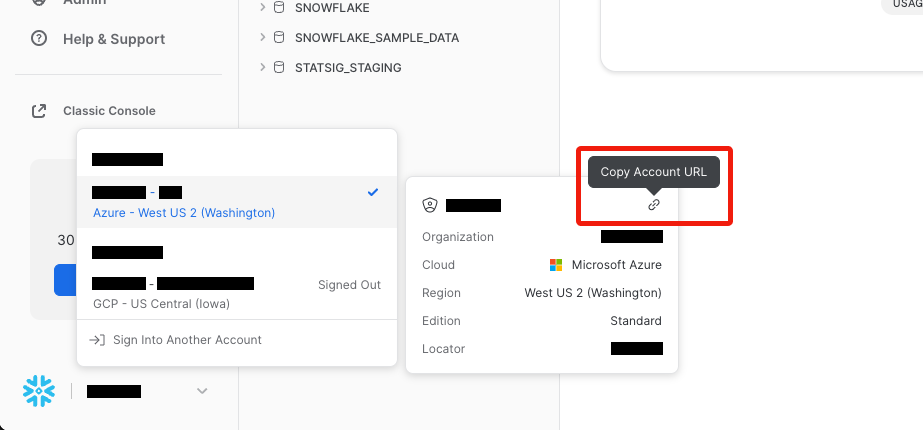
For the Account Name field, please enter in the format of <id>.<region>.<provider>. So, your information may look something like this:xy12345.us-central1.gcpTo get this information navigate to bottom left in your Snowflake console, as shown in the picture below and copy the link URL:
The copied URL will look something like this:https://xy12345.us-central1.gcp.snowflakecomputing.comYou can extract information from here to get the required fields for Account Name, which for this example would be xy12345.us-central1.gcp.
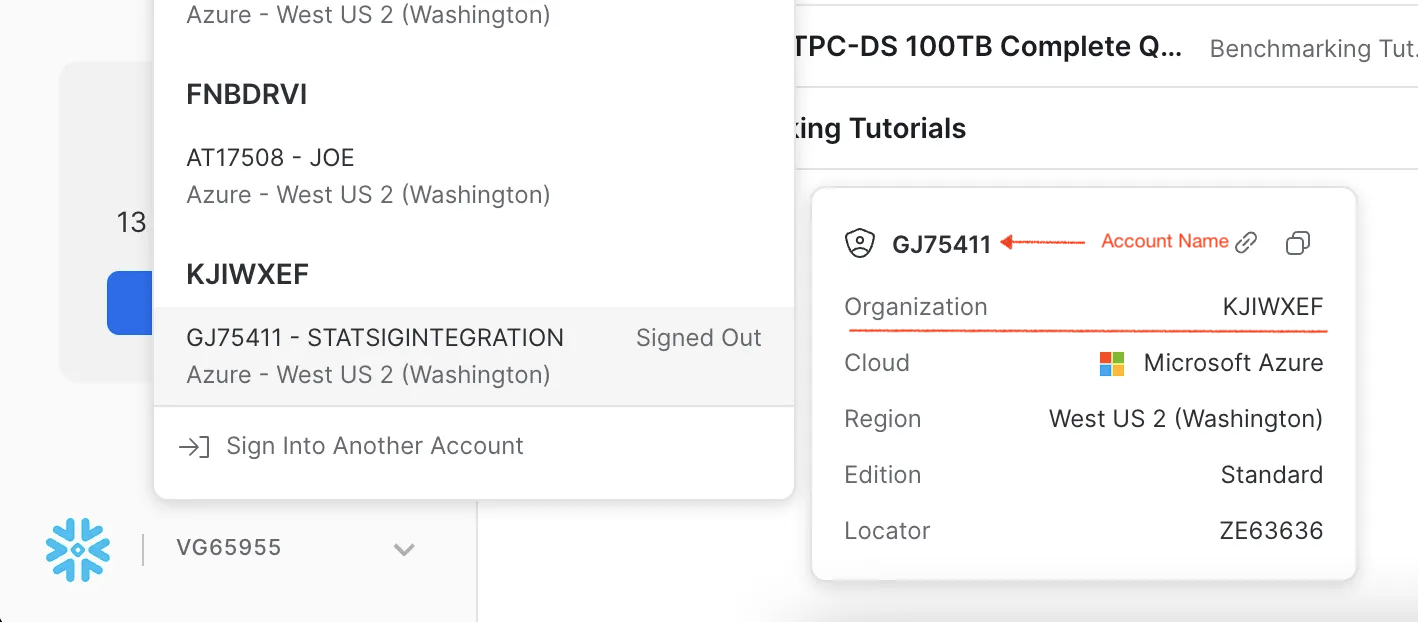
For the Account Name field, you can also enter your Snowflake account identifier, which typically takes the form <orgname>-<account_name>. To find the <orgname> in the Snowflake console, click on your account profile (usually at the bottom left) to view account details as shown below.
To set up key-pair authentication, first follow the snowflake documentation to generate the private and public keys, and then set the public key on the service user.The private key can then be provided here
To create a Statsig user with the sufficient privileges, as well as a Statsig staging Schema, run the following code in your Snowflake worksheet that has sysadmin and securityadmin roles.Replace <USER> and <PASSWORD> with your value, which you will copy over into our console.Depending on the scope of your data, you may want to adjust the size of the warehouse created.
Copy
BEGIN; -- set up variable values to be used in statements later -- make sure to configure user_name and user_password with your own values SET user_name = '<USERNAME>'; -- REPLACE WITH YOUR OWN VALUE SET user_password = '<PASSWORD>'; -- REPLACE WITH YOUR OWN VALUE SET role_name = 'STATSIG_ROLE'; -- change role to sysadmin for warehouse / database steps USE ROLE sysadmin; -- create a warehouse, database, schema and tables for Statsig CREATE OR REPLACE WAREHOUSE STATSIG WITH warehouse_size='XLARGE'; -- adjust based on your data size CREATE DATABASE IF NOT EXISTS STATSIG_STAGING; CREATE SCHEMA IF NOT EXISTS STATSIG_STAGING.STATSIG_TABLES; -- change current role to securityadmin to create role and user for Statsig's access USE ROLE securityadmin; -- create role for Statsig CREATE ROLE IF NOT EXISTS identifier($role_name); GRANT ROLE identifier($role_name) TO ROLE SYSADMIN; -- create a user for Statsig CREATE USER IF NOT EXISTS identifier($user_name) password = $user_password default_role = $role_name default_namespace = STATSIG_STAGING.STATSIG_TABLES default_warehouse = STATSIG; GRANT ROLE identifier($role_name) TO USER identifier($user_name); -- grant Statsig role access to create warehouse and schema GRANT USAGE ON WAREHOUSE STATSIG TO ROLE identifier($role_name); GRANT USAGE ON SCHEMA STATSIG_STAGING.STATSIG_TABLES TO ROLE identifier($role_name); GRANT CREATE SCHEMA, MONITOR, USAGE ON DATABASE STATSIG_STAGING TO ROLE identifier($role_name); -- ONLY GIVE THIS LEVEL OF ACCESS in the staging schema. GRANT CREATE TABLE, CREATE FUNCTION ON SCHEMA STATSIG_STAGING.STATSIG_TABLES TO ROLE identifier($role_name); GRANT SELECT, UPDATE, INSERT, DELETE ON ALL TABLES IN SCHEMA STATSIG_STAGING.STATSIG_TABLES TO ROLE identifier($role_name); GRANT SELECT, UPDATE, INSERT, DELETE ON FUTURE TABLES IN SCHEMA STATSIG_STAGING.STATSIG_TABLES TO ROLE identifier($role_name); GRANT OWNERSHIP ON FUTURE TABLES IN SCHEMA STATSIG_STAGING.STATSIG_TABLES TO ROLE identifier($role_name); -- grant Statsig role read access to database and schema passed in -- do this at a table level, database level, and/or schema level -- for data Statsig needs to access GRANT USAGE ON DATABASE <DATABASE> TO ROLE identifier($role_name); GRANT USAGE ON SCHEMA <DATABASE>.<SCHEMA> TO ROLE identifier($role_name); GRANT SELECT ON ALL TABLES IN DATABASE <DATABASE> TO ROLE identifier($role_name); GRANT SELECT ON FUTURE TABLES IN DATABASE <DATABASE> TO ROLE identifier($role_name); GRANT SELECT ON ALL VIEWS IN DATABASE <DATABASE> TO ROLE identifier($role_name); GRANT SELECT ON FUTURE VIEWS IN DATABASE <DATABASE> TO ROLE identifier($role_name);COMMIT;
Warehouse Explorer makes it easy to find and bring data from any table into Statsig for ad-hoc analysis.To enable the Warehouse Explorer analytics feature, you should provide Statsig with additional permission to query the INFORMATION_SCHEMA metadata tables. These tables let the Statsig user read schema, column, and table definitions.
Copy
GRANT USAGE ON SCHEMA <DATABASE>.INFORMATION_SCHEMA TO ROLE identifier($role_name);